Catch Problems Before Customers Do
Video Transcript
What Is a Control Chart?
A control chart is a key tool in Statistical Process Control (SPC). It tracks if a process stays stable over time.
SPC is a method that uses statistics to monitor and control processes. It was developed by Walter Shewhart in the 1920s and later expanded by W. Edwards Deming.
The chart shows data points with:
- Upper and lower control limits
- A center line (process average)
When points fall outside limits, teams look for causes:
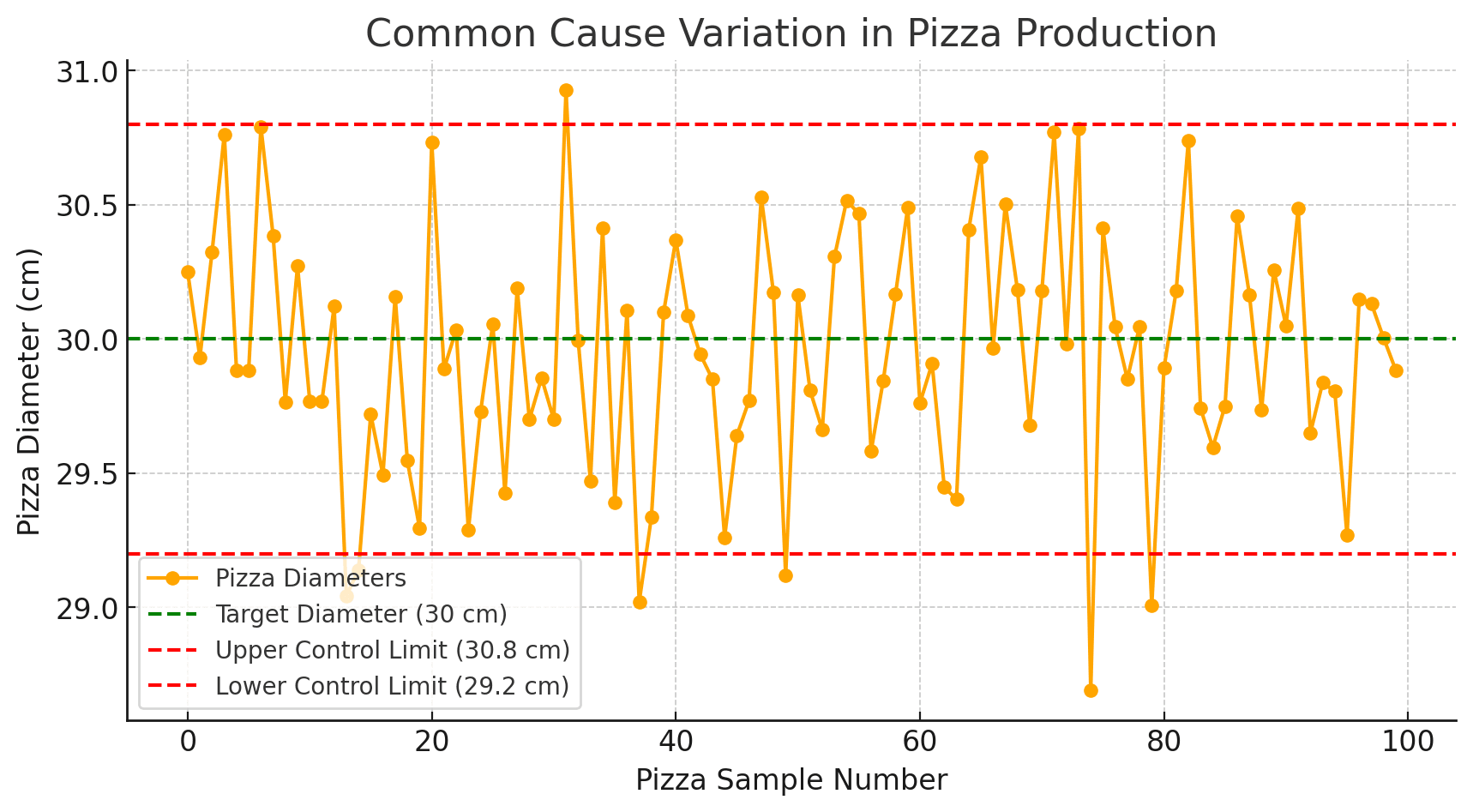
- Common causes: Normal, built-in process variation
- Special causes: Unusual events that need fixing
Why Use a Control Chart?
1. Detect Problems
The primary objective of a control chart is to detect significant process variation or trends, which may indicate a problem or an opportunity for process improvement.
2. Continous Improvement
Even though control charts are meant for problem detection, they also serve as an instrument for improvement. Even in stable processes, analyzing patterns and trends within common cause variation can identify areas for process improvement. A process that has less common cause variation can be more efficient and capable.
When to Use Control Charts
Use Control Charts when you need to monitor process stability over time and distinguish between normal variation and signals that require action. They answer the critical question: “Is my process in control, or is something wrong?”
Typical triggers are:
Process Stability Monitoring
When you need to know if a process is STABLE (predictable) or UNSTABLE (erratic), Control Charts provide the answer. A stable process stays within control limits; an unstable process shows patterns, trends, or points outside limits that demand investigation.
Distinguishing Special vs. Common Cause
Not all variation is equal. Common cause variation is inherent to the process; special cause variation signals something changed. Control Charts mathematically separate the two – preventing both over-reaction to noise AND under-reaction to real problems.
Six Sigma Control Phase
The final DMAIC phase is CONTROL – sustaining the gains. Control Charts are THE tool for this phase. Without ongoing SPC, improvements decay. The chart becomes your early warning system against backsliding
After Process Changes
After implementing improvements (new equipment, new parameters, new materials), Control Charts verify the change worked AND the process remains stable. They’re your proof that the improvement stuck.
Preventive Quality Control
Instead of detecting defects AFTER they occur (inspection), Control Charts detect process DRIFT before it creates defects. Seeing the trend toward the limit lets you adjust before crossing it. Prevention beats detection.
Customer or Regulatory Requirements
Many industries (automotive, aerospace, medical devices) REQUIRE SPC for critical characteristics. IATF 16949, AS9100, and FDA regulations specify Control Chart usage. Compliance isn’t optional – it’s documented evidence of process control.
Supplier Quality Agreements
When suppliers must demonstrate process control, Control Charts are the standard evidence. Incoming quality agreements often specify: “Supplier shall provide Control Charts for characteristics X, Y, Z.” No charts = no approval.
Machine Qualification & Validation
New machines need proof they can hold tolerances consistently. Control Charts during qualification runs demonstrate stability before production release. Equipment validation without SPC is incomplete.
Reducing Over-Adjustment (Tampering)
When operators adjust processes based on individual measurements, they often make things WORSE – reacting to normal variation as if it were a problem. Control Charts show when to adjust (special cause) and when to leave alone (common cause).
Principles of a Control Chart

Common Cause Variation
Also known as "random variation," this type of variation is inherent in the process. It is natural, predictable, and always present to some degree.
Common cause variation is due to factors that are consistently and routinely part of the process. These could include slight differences in machine calibration, environmental conditions, or human performance.
Control charts help in identifying the extent of common cause variation and determining whether the process is stable (in statistical control).
This ends up providing organizations the definition of what is broken, or what could be made better resulting in effective planning and execution becoming a necessity — to aim all the efforts towards effective results.ess more efficient and effective.
Special Cause Variation
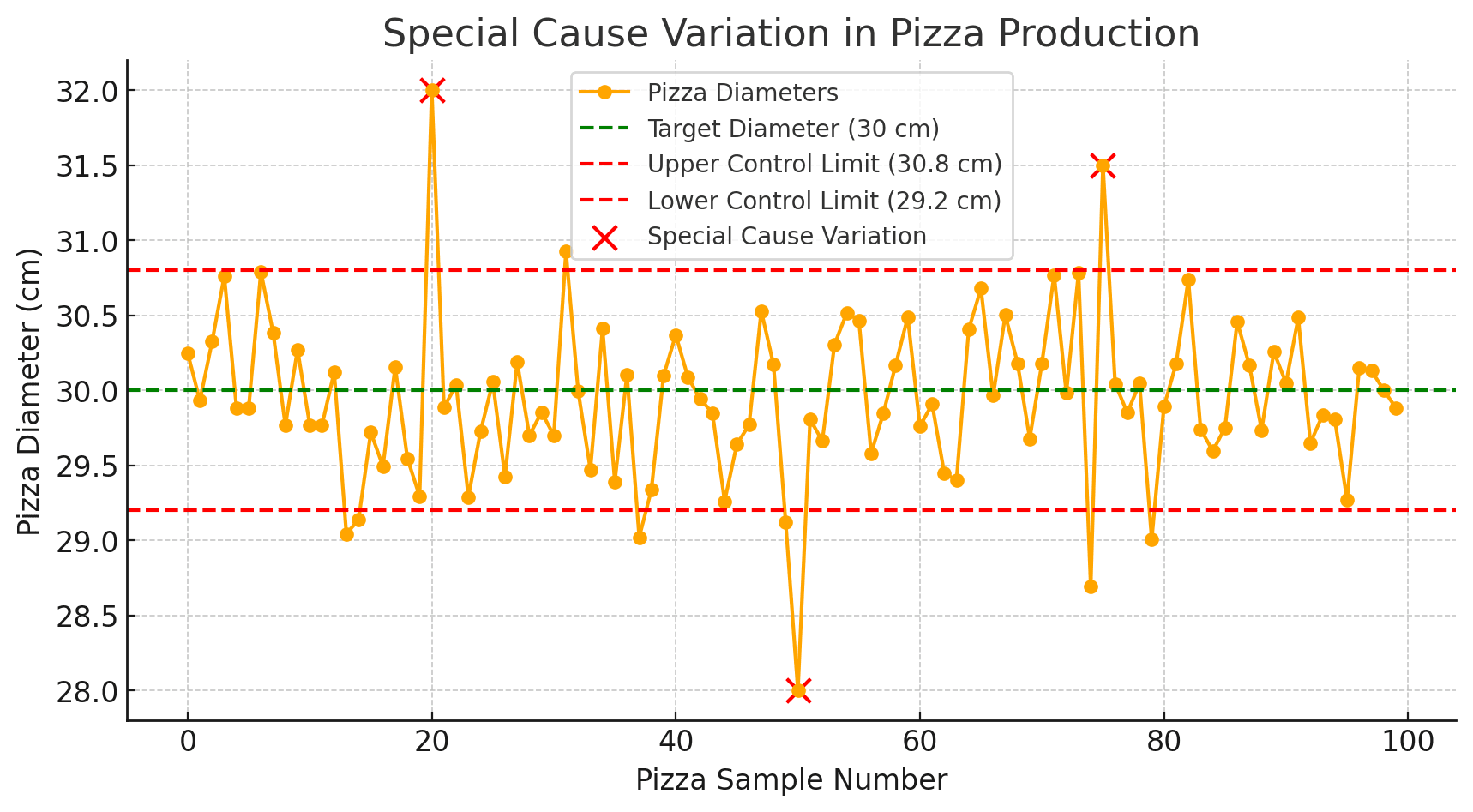
Special Cause Variation refers to anything that differs from standard practices, not an integral part of the process but something special, anomalous or situational.
For instance, a breakdown of the machine line you are attempting to measure is Special cause variation which cannot be predicted while Common Cause variation may result from factors like material quality, environmental conditions etc.
If a control chart suggests that the process contains special cause variation, then it means that the process is still not in statistical control and needs further investigation and need to be corrected.

Stability and Predictability
A process is known to be stable or in statistical control if it shows just common cause variation.
To check the stability of our process we use some control charts. A predictable process is one that has control limits and, based on the previous study… it looks determined to stay well within them.

Control Limits vs. Specification Limits
The control limits are statistically derived from existing process data, but they are not the same as specification limits (Upper and Lower spec limit) which are determined by customer requirements or design specifications:
- Control Limits are process-driven and show the natural variation in production.
- Specification Limits are customer-driven and define acceptable product sizes.
Variation ranges, reflect natural variation and specification limits indicate the allowable range of variation for the process output to meet customer expectations.
How to Create a Control Chart
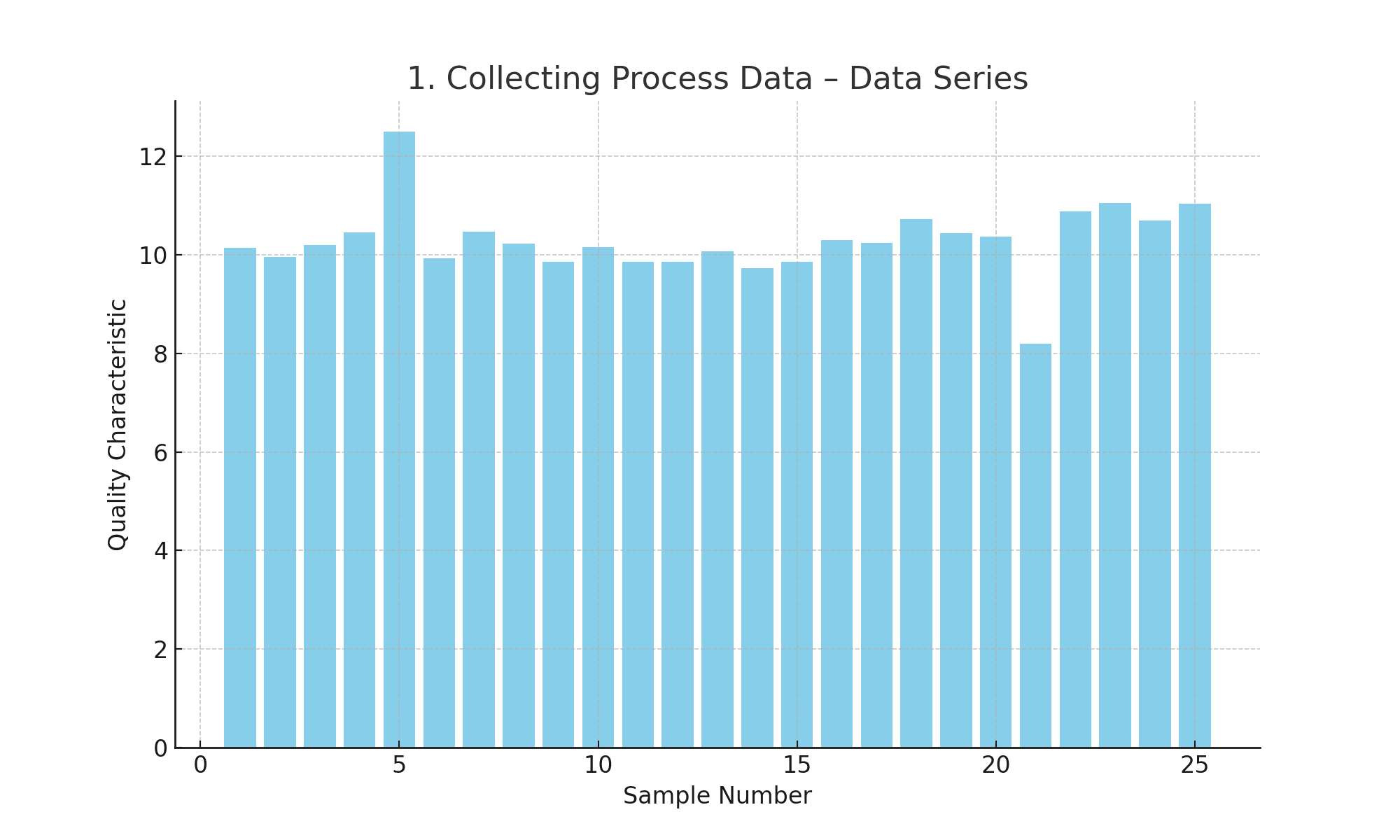
1. Collect Data from the Process
To begin using a control chart, the first step is to collect relevant data from the process you intend to monitor. This involves identifying a specific quality characteristic or measurement, such as the diameter of a part or the time taken to complete a task.
Data should be collected systematically at regular intervals to ensure consistency. It’s important to ensure that the data is accurate and representative of the process under normal operating conditions. For instance, if you’re monitoring a manufacturing process, you might collect data from consecutive units produced or at regular time intervals.
2. Calculate Average, Upper, and Lower Control Limits
Compute central tendency of data (usually mean for variable data and proportion or count for attribute data) on your existing set of data. Then, we need to set the control limits. These constraints are usually placed at three standard deviations from the mean in each direction.
In our example:
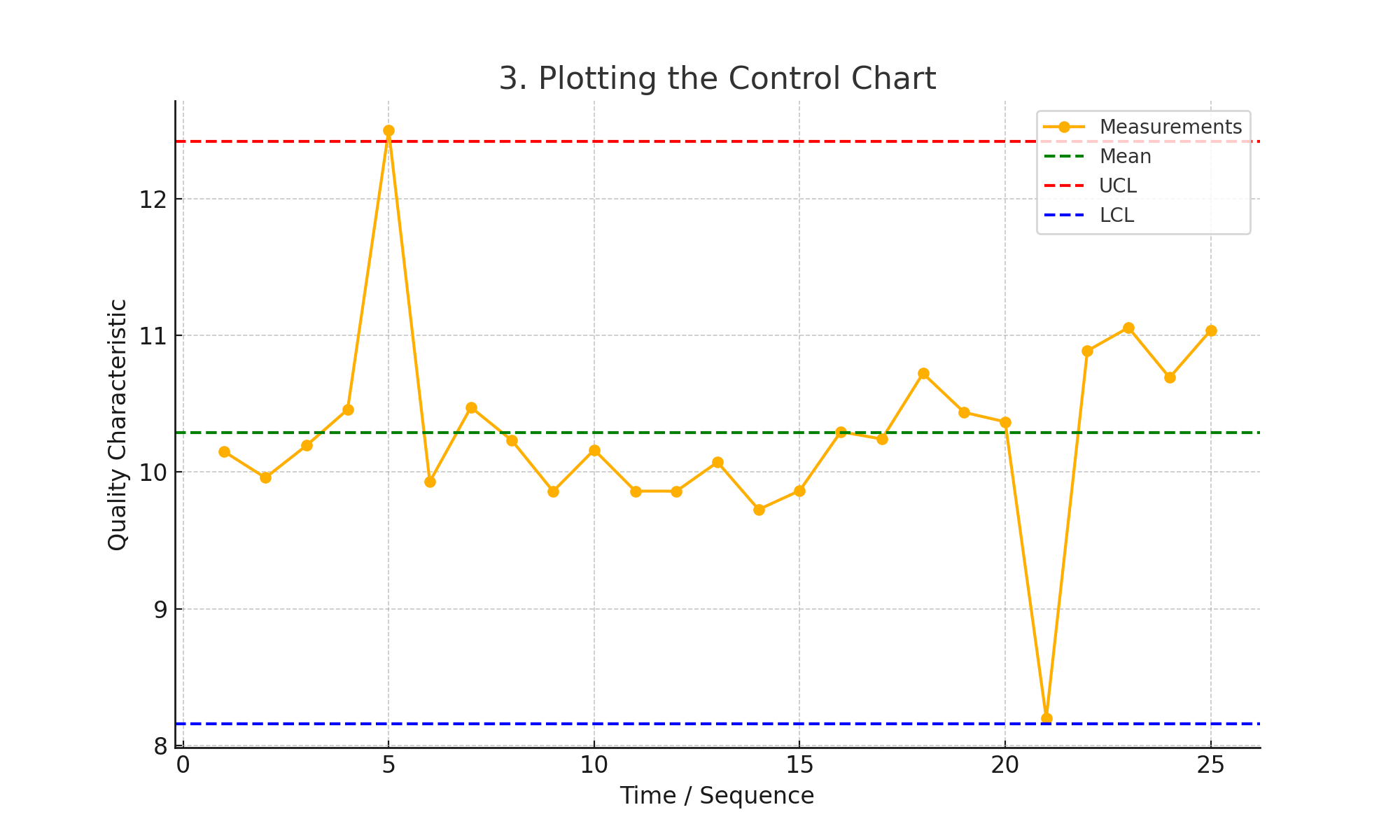
Mean (𝑥̄): 10.52
Standard deviation (σ): 0.80
Upper Control Limit (UCL): 𝑥̄ + 3σ = 12.93
Lower Control Limit (LCL): 𝑥̄ − 3σ = 8.10
The boundaries of expected process variation are set by the upper control limit (UCL) and lower control limit (LCL). These limits are calculated differently for each type of control chart and vary depending on the distributions of the data. Accurate statistical methods need to be used in these calculations so as to protect the integrity of the control chart.
3. Plot the Data and Limits on the Chart
With the data, average, and control limits in hand, the next step is to plot them on the control chart. The chart typically has time or sequence on the horizontal axis and the quality characteristic being measured on the vertical axis.
Plot each data point, and then draw a central line for the average and two lines for the UCL and LCL. The visual representation of data against these limits helps in easy monitoring of the process over time. Ensure that the chart is clear and accurately scaled to facilitate easy interpretation.
4. Study the Graph for Patterns or Trends
The last step is to keep analyzing the control chart regularly to check if there are any patterns or trends. Signs of special cause variation if exist as a series of high or low points on one side of the mean, sudden shifts in the level of the process and results out of control limits.
Keep an eye out for patterns that can point to problems within the process (cyclical variability, etc.) Its regular examination reveals symptoms of any problem well in time before it starts. And it is also helpful to verify any changes or optimizations in the process.
You can use the so-called Nelson Rules in order to gain further insights:
Control Chart Rules: Nelson's 8 Patterns
Nelson Rules help detect unusual patterns in control charts. They got their name from Lloyd S. Nelson. He was a quality control expert who worked at Nashua Corporation. In 1984, he published these rules in the Journal of Quality Technology. Nelson developed these eight tests to spot unusual patterns in control charts. Before his work, quality control teams had fewer ways to detect problems. His rules made it easier to see when a process was going out of control. Today, his name remains attached to these rules as a way to honor his contribution to statistical process control. The rules are now a standard tool in quality management systems around the world.
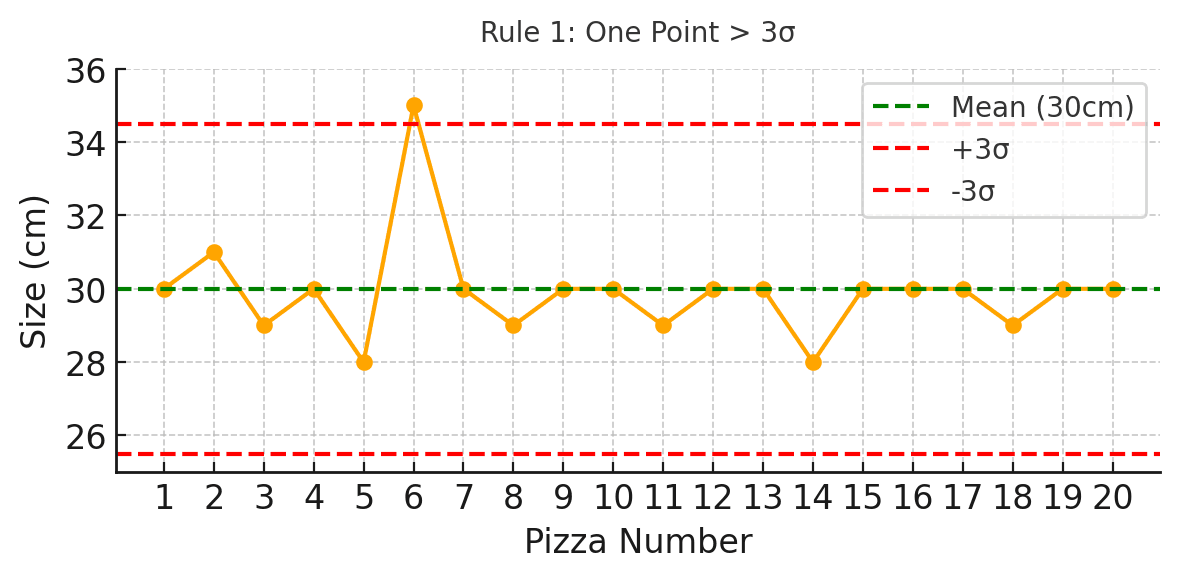
Rule 1: One point is more than 3 standard deviations from the mean (outlier)
Imagine checking pizza sizes. Most are close to 30 cm. Suddenly, one pizza is 35 cm. It’s way too big. This shows something unusual happened. Maybe the dough was wrong or a machine messed up. One big mistake like this needs a fast fix.
Rule 2: Nine (or more) points in a row are on the same side of the mean (shift)
You notice that for nine pizzas in a row, every single one is about 31–32 cm. They aren’t crazy big, but they are all slightly above the target. This points to a shift. Maybe a new worker made pizzas a little bigger without meaning to.
Pattern:
Small shifts from the average
Trigger Condition:
Nine (or more) points in a row are on the same side of the mean (shift)
Potential Causes:
- Raw material change
- Change in work instruction
- Different measurement device/calibration
- Different shift
- Person gains greater skills in doing the job
- Change in maintenance program
- Change in setup procedure
Rule 3: Six (or more) points in a row are continually increasing or decreasing (trend)
Each pizza keeps getting a bit bigger than the last. One is 29 cm, next 29.5 cm, next 30 cm, and so on. This slow trend means something is drifting over time. Maybe the dough is warming up or the oven is expanding.
Rule 4: Fourteen (or more) points in a row alternate up and down (zigzag)
The pizzas keep switching between bigger and smaller with each batch. One is 29 cm, next is 31 cm, next 28.5 cm, then 31.5 cm. Over and over. This wild swinging shows someone or something keeps messing with the process.
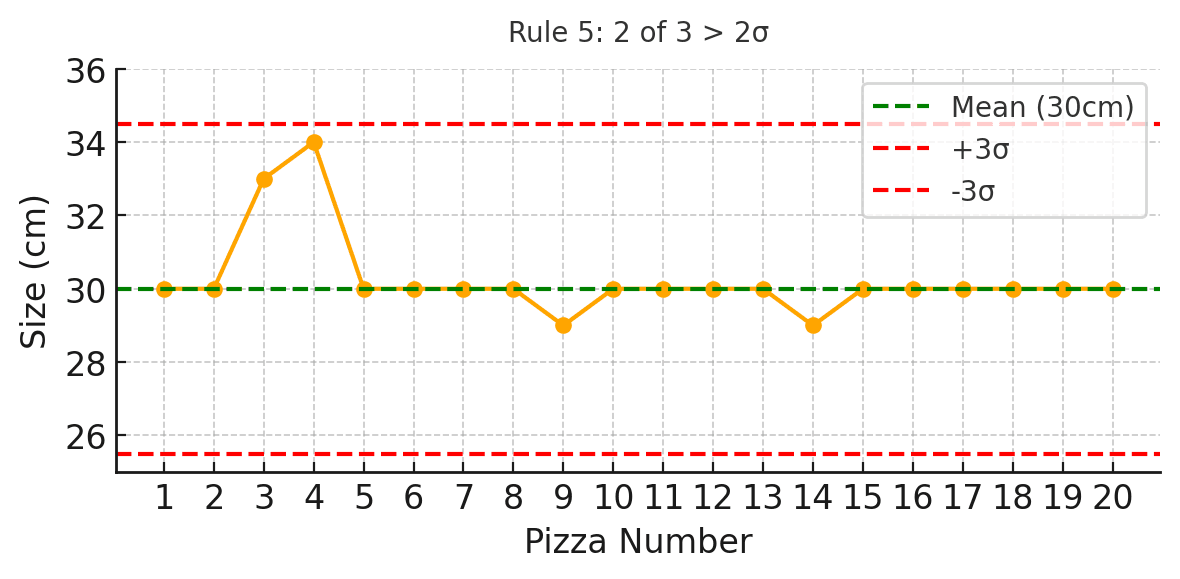
Rule 5: Two (or three) out of three points are more than 2 standard deviations from the mean in the same direction
Out of three pizzas, two are way oversized—like 33 cm and 34 cm. Even if the third pizza is okay, the two outliers show trouble. A big jump like this could mean a serious setup or recipe mistake.
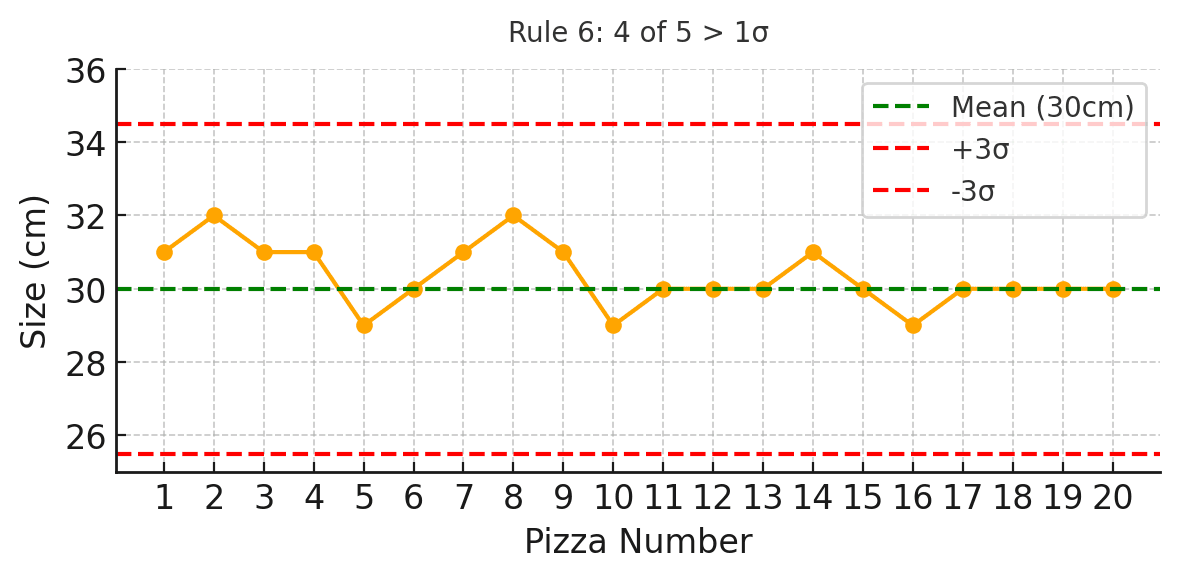
Rule 6: Four (or five) out of five points are more than 1 standard deviation from the mean in the same direction
Four out of five pizzas are slightly too big, maybe 30.5 to 31 cm. Not crazy wrong, but clearly drifting. This kind of small but steady shift hints that something minor changed—maybe a new way of measuring dough.
Pattern:
Small shifts from the average
Trigger Condition:
Four (or five) out of five points in a row are >1 SD from the mean in the same direction
Potential Causes:
- Raw material change
- Change in work instruction
- Different measurement device/calibration
- Different shift
- Person gains greater skills in doing the job
- Change in maintenance program
- Change in setup procedure
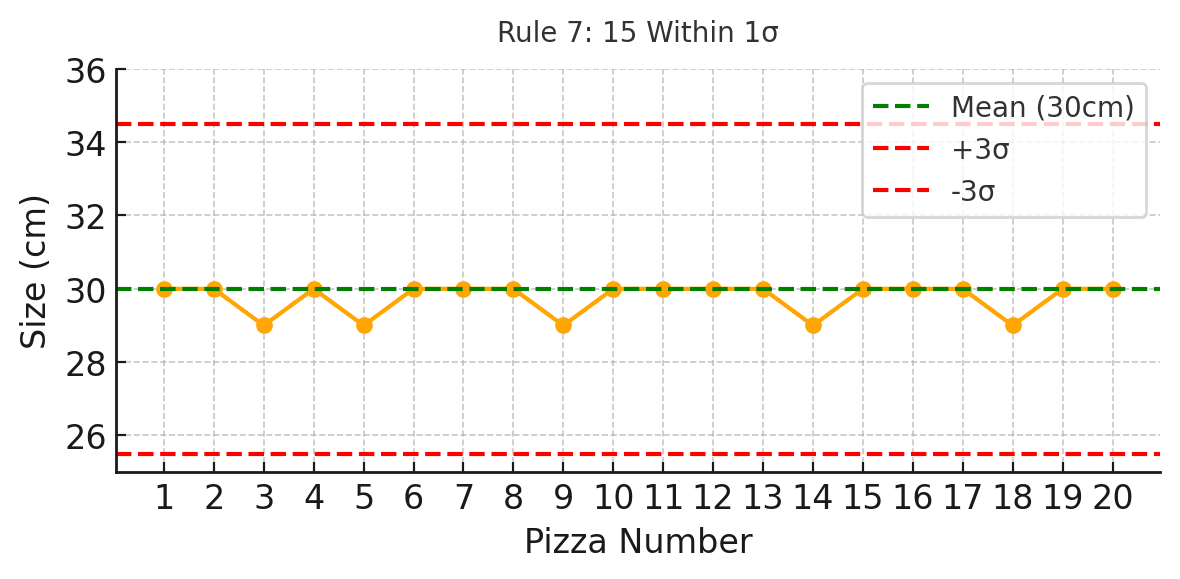
Rule 7: Fifteen points in a row are all within 1 standard deviation of the mean
Fifteen pizzas have been made, and every single one is nearly perfect—29.8 to 30.2 cm. That sounds good, but it could mean a measurement problem. Maybe your scale is stuck, or you aren’t catching real problems.
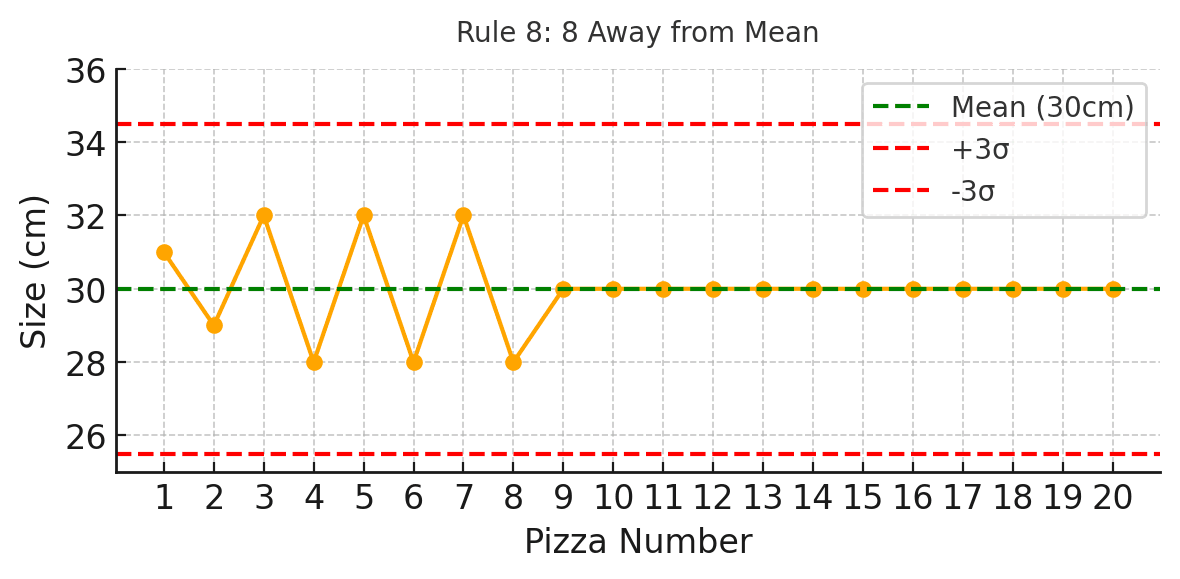
Rule 8: Eight points in a row with none near the mean (bimodal mix)
The pizza sizes jump wildly—one is 28 cm, the next is 32 cm, back to 28.5 cm, then 31.5 cm. No pizzas are near 30 cm. It looks like two different recipes are being used at the same time without anyone noticing.
How to Combine Control Charts with Other Quality Tools
Ishikawa Diagram
Out-of-control signals trigger root cause investigation. Ishikawa brainstorms potential causes for the special cause variation. The Control Chart identifies WHEN things went wrong; Ishikawa explores WHY.
5-Why Analysis
After Ishikawa generates hypotheses, 5-Why drills to true root cause. Control Chart → Ishikawa → 5-Why is a powerful investigation sequence. Each tool builds on the previous: Signal → Hypotheses → Root Cause.
Pareto Chart
When a Control Chart signals “out of control,” Pareto Analysis helps identify which defect types dominate. The Control Chart says “something’s wrong NOW”; Pareto says “HERE’s what’s wrong most often.” Diagnosis follows detection.
Histogram
Control Charts show variation OVER TIME; Histograms show variation DISTRIBUTION. Use both: the Control Chart asks “Is the process stable?” while the Histogram asks “What shape is the variation?” Together, they give complete variation understanding.
Correlation / Scatter Diagrams
When Control Charts show special causes, Scatter Diagrams can identify which input variable correlates with the output shift. “Output went out of control when Input X changed” – correlation analysis finds the relationship.
MSA / Gage R&R
Before trusting Control Chart signals, verify your measurement system works. MSA proves your gages can detect real variation – not just measurement noise. An inadequate measurement system makes Control Charts meaningless. MSA first, then SPC.
Process Capability (Cp/Cpk)
Control Charts prove stability; Capability indices quantify performance. First, demonstrate statistical control with the chart. Then, calculate Cpk to show HOW WELL the stable process meets specifications. Sequence matters: stability → capability.
Action Management
Each out-of-control signal should trigger an action item: Investigate, identify cause, implement correction, verify. Control Charts feed Action Management with dated, quantified triggers. No signal should go without documented response
FMEA
PFMEA identifies high-risk characteristics (high RPN or Severity); Control Charts monitor them. The connection is direct: PFMEA column “Detection” often specifies “SPC” as the control method. High-severity items deserve Control Chart vigilance.
Check Sheets (Tally Sheets)
Check Sheets count attribute defects; Control Charts (p-chart, np-chart, c-chart, u-chart) monitor those counts over time. The Check Sheet provides the data point; the Control Chart shows whether that point signals a problem.
8D Report
Control Chart signals often initiate 8D investigations. The out-of-control condition becomes D2 (Problem Description); the chart data feeds D4 (Root Cause Analysis); post-action charts verify D6 (Verification). SPC and 8D are natural partners
OEE (Overall Equipment Effectiveness)
Quality is one OEE component. Control Charts monitor the Quality rate in real-time, feeding OEE calculations. Out-of-control quality conditions directly impact OEE scores – making the business case for SPC visible.
Control Plan
CAPA Management
Recurring out-of-control signals, even after correction, indicate systemic issues requiring formal CAPA. The Control Chart provides trend evidence; CAPA addresses the underlying system failure. Pattern of signals → CAPA initiation.
Benefits of a Control Chart
Alerting to Process Problems Before They Snowball
Process issues are quickly detected by control charts. Method process capability is continuously monitored against previously defined limit standards, as and when these exceed the limits set, they are immediately flagged up.
This early warning is critical as it provides time for immediate follow up if needed to prevent problems from developing into significant concerns. In a manufacturing example, a control chart could show a gradual increase in product defects and an opportunity to make equipment repairs or process adjustments long before the defect rate becomes unacceptable.
Process Consistency
Control charts are all about keeping processes consistent and consistency is the most essential component of any process. Control charts show you how your process works over time and establish patterns of variability to ensure that your process is working within limits. The continuous monitoring enables in stabilizing the process and maintaining the quality of output. In an environment like pharmaceutical production, you can employ control charts for ensuring that every batch product is compliant with the specified standards.
Enable Continuous Improvement
Control charts are not only used for problem detection but it is also important for continuous improvement of the process. Organizations can improve processes even when a process is in control limits by doing deep dive of the data observed through a long period of time. This more proactive form of improvement leads to innovations in approaches, decreases in variation and increases in overall process capability. In the service industry, a control chart could be utilized to help manage customer service processes and deliver a greater level of satisfaction to your customers.
Minimize Waste and Maximize Efficiency
By using control charts, the amount of waste is decreased as well as efficiency improvement and one of the most basic benefits. It helps in reducing the unnecessary wastage of materials, time and resources by identifying and correcting variations in the process. This optimisation results in cost saving from the operations side. If you are in supply chain management, you can use the control charts to find bottlenecks in your logistics process leading to improved inventory and reducing lead times resulting in leaner operations.
Limitations of a Control Chart
It does require some basic statistics knowledge
One of the major drawbacks to control charts are that the use can be limited when awareness of fundamental statistics is not adequate. In order to properly execute and interpret that data, the user needs to understand familiar terms like mean, standard deviation, control-limits, common cause variation vs. special cause variation. If you skip this step, you may end up setting up the chart wrong and misinterpreting your data.
It is not ideal in environments where staff do not have statistical training as it is another level of education that is required or specialist that you have to refer the data to.
Incorrect conclusions based on misinterpretation
Control charts are beneficial; nevertheless, control charts may be misinterpreted by the unversed individuals in some control chart characteristics. The wrong reading of this chart or simply the overreaction to normal process variability can result in unnecessary adjustments, which might do more harm than good.
For example, confusing inherent process variability with a special cause may result in unnecessary changes to the processimulation. It illustrates a risk that highlights the importance of thorough training and practice in interpreting control charts and therefore being able to make knowledge driven decisions based on evidence.
Not Ideal for high variability processes
High intrinsic variability in the process: Control charts are relatively insensitive to changes if they are smaller than the natural variation inherent with a process. In these situations, the control limits could be too large to highlight useful process changes.
The high variability can hide the existence of special causes, which in turn makes more difficult its detection and solution. However, for processes that are inherently unstable or highly variable the desired level of process control and improvement may have to be attained through some alternative means or by supplementing conventional quality control with a method that can provide robust real-time process monitoring.
Control Chart Best Practices

Make data clean and relevant.
Control charts only work as well as the data chosen to build them. The data collection techniques needs to be quite strong and reliable. This involves establishing the accuracy of measuring devices, that data meets quality criteria and that it is representative of the process operating under normal conditions.
Prevent biases or errors in data-collection. For example, the accuracy of the data on which control charts are based can be substantially increased in a production process by using calibrated instruments and making sure that people who record the data follow correct data recording methods.

Update And Review Control Charts Frequently
Keep in mind that control charts are not static set-and-forget tools, they need to be updated and reviewed on regular bases. It consists of periodically adding new data to the plot, retaking control limits and verifying how the process is performing. Regular reviews lead to early recognition of the changing trends or process.
When the process or methods of production have changed, it is necessary to review this control chart and ensure that they reflect the current state of monitoring the process. In practice, having regularly scheduled updates and reviews of control charts will ensure continuous monitoring and improvement in the process.
Integrate with Other Various Quality Tools for Comprehensive Analysis
Control charts are powerful, but the power of a good control chart increases when it is supported by other quality tools. Control charts combined with tools such as Pareto charts, cause-and-effect diagrams and process flowcharts offer a fuller picture of the process and its variances. In this process, we have a more sophisticated way to analyze and understand the root causes of variations in the system using the combined data from these 2 segments.
For instance, if a control chart shows a change in process performance, then performing root cause analysis can be used to easily use fishbone diagram as it helps the root causes leading to the shift. This is achieved through the use of a multi-tool approach, which provides a greater level of understanding in process behaviors and systems, leading to better quality improvement. process more effective and sustainable.
Control Chart Example: Pizza Baking
Monitoring Cook Times for Pizza
Zero-Defect Pizza wants to start tracking the baking time of your pizzas exactly in order to serve them all at the best quality as humanly possible. They choose control charts to monitor how well their baking times are sticking within certain limits.
In this case, the pizzeria has done testing to establish that their Margherita pizzas typically get cooked in exactly 10 minutes — any less and it’s undercooked; any more and it’s overcooked. Anything lower or higher will only result in undercooked and over cooked pizzas.
They decide to use a control chart and track the baking times for one week. Everyday, for the next few days of their lunch rush, they time 5 random pizzas to bake and document the duration.
1. Collect data
Over a period of one week, the pizzeria collects data on 5 pizzas each day.
Here’s an example of the baking times collected (in minutes) over 7 days:
| Day | Pizza 1 | Pizza 2 | Pizza 3 | Pizza 4 | Pizza 5 | Average Time |
|---|---|---|---|---|---|---|
| Monday | 9.2 | 9.8 | 10.1 | 9.5 | 9.9 | 9.7 |
| Tuesday | 10.0 | 10.2 | 10.1 | 9.9 | 10.3 | 10.1 |
| Wednesday | 9.8 | 9.9 | 10.1 | 10.2 | 10.0 | 10.0 |
| Thursday | 9.5 | 9.6 | 10.0 | 9.8 | 9.7 | 9.7 |
| Friday | 10.3 | 9.9 | 10.2 | 9.8 | 9.7 | 10.0 |
| Saturday | 9.9 | 10.0 | 9.8 | 9.6 | 10.1 | 9.88 |
| Sunday | 10.0 | 9.7 | 9.9 | 9.6 | 10.1 | 9.86 |
2. Determine control limits
- Target baking time (mean) = 10 minutes.
- Upper Control Limit (UCL) = 11 minutes.
- Lower Control Limit (LCL) = 9 minutes.
3. Plot the data
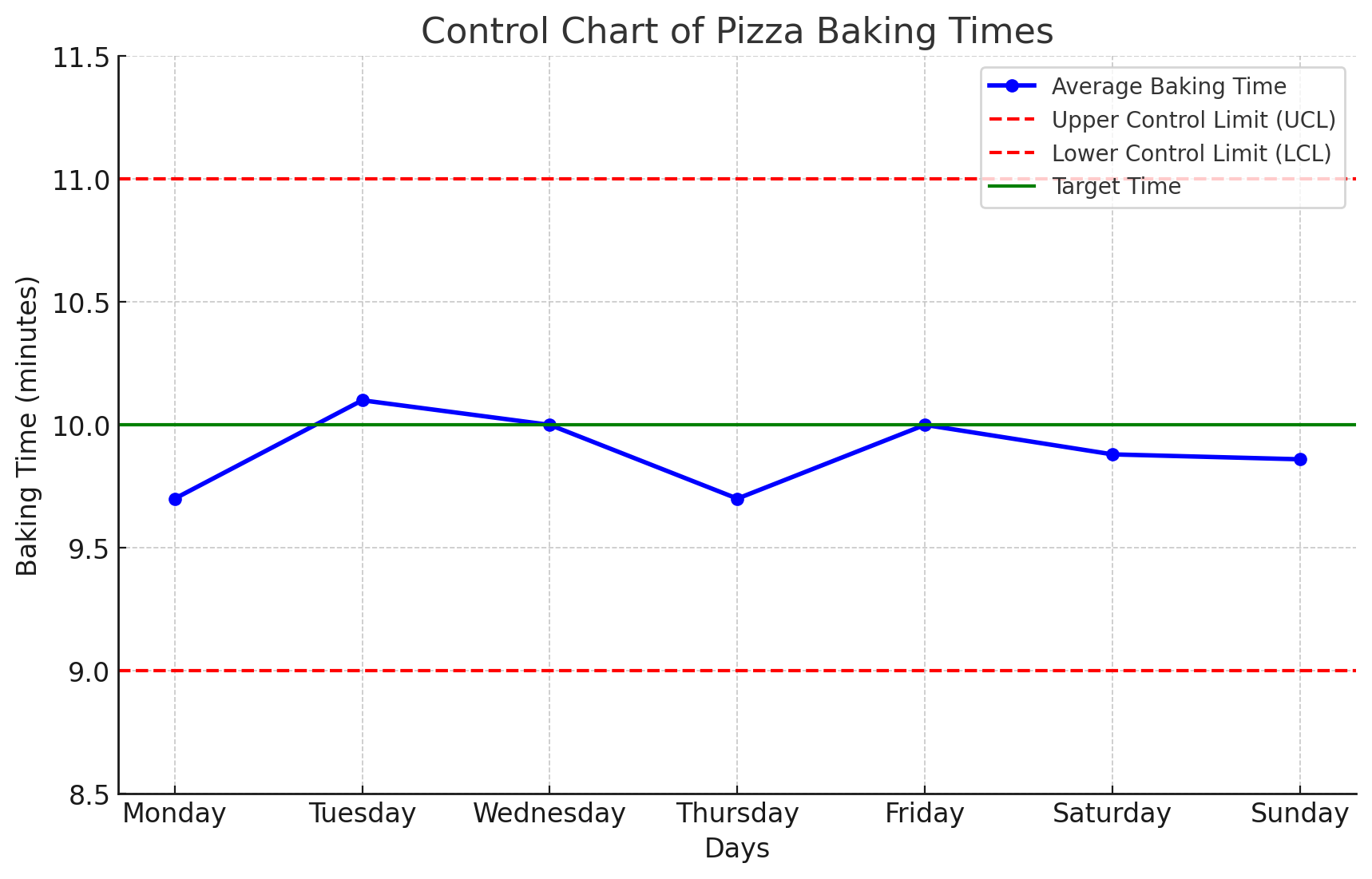
A control chart is used to visualize the average baking times for each day, comparing them to the target and control limits.
4. Study the graph
The chart baking times data shows:
- Blue line with markers: The average baking time for each day.
- Green solid line: The target baking time of 10 minutes.
- Red dashed lines: The upper control limit (UCL) of 11 minutes and the lower control limit (LCL) of 9 minutes.
This chart helps visually track how closely the baking times are to the target and whether they stay within the control limits. The process appears to be stable, with all data points falling within the control limits, producing perfectly baked mouth-watering pizzas.
FAQ Control Chart
What is a control chart?
A control chart is a statistical tool used in quality control processes to monitor and analyze variations in a process over time. It helps in identifying whether a process is stable or if there are deviations that need corrective actions.
What are the most common control chart types?
The most commonly used control charts include:
- X̄ and R Chart (Mean and Range Chart) – Used for monitoring the mean and range of subgroups.
- P-Chart (Proportion Chart) – Used for measuring the proportion of defective items in a sample.
- C-Chart (Count Chart) – Used for tracking the count of defects in a process.
- U-Chart – Used for monitoring the number of defects per unit.
- Individuals and Moving Range (I-MR) Chart – Used for single measurements over time.
When are control charts used?
Control charts are used in various scenarios, including:
- Manufacturing processes to monitor production consistency.
- Healthcare to track patient safety measures and treatment effectiveness.
- Software development to track defects or errors in code.
- Customer service to measure response time and customer satisfaction trends.
Why is a control chart used?
A control chart is used to:
- Detect and correct deviations from a stable process.
- Prevent defects by identifying early warning signs.
- Reduce process variability.
- Improve efficiency by identifying patterns and trends.
- Make data-driven decisions.
What are the principles of a control chart?
The key principles of a control chart include:
- Continuous monitoring – Processes should be observed over time.
- Upper and lower control limits – These define the acceptable range of process variation.
- Common cause vs. special cause variation – Helps in distinguishing between normal process fluctuations and significant changes requiring corrective action.
- Data-driven decision-making – Control charts provide visual evidence for process stability.
How are control charts used?
Control charts are used by:
- Collecting data from a process at regular intervals.
- Plotting data points on the chart.
- Establishing control limits based on historical data.
- Monitoring trends and identifying patterns.
- Taking corrective actions if variations exceed control limits.
What are the benefits of control charts?
- Early detection of issues before they become major problems.
- Improved process stability and quality assurance.
- Cost reduction by minimizing waste and defects.
- Better decision-making based on real-time data.
- Increased efficiency in monitoring and managing workflows.
What are the limitations of control charts?
- Requires accurate data collection to be effective.
- May not work well for highly irregular or unpredictable processes.
- Initial setup and training can be time-consuming.
- Does not fix process issues – only identifies them.
What are best-practices for using control charts?
- Use appropriate chart types based on the type of data.
- Ensure data accuracy and consistency.
- Regularly review control limits to adjust for process changes.
- Differentiate between normal variations and real process issues.
- Train staff on interpreting control charts correctly.